Overview
A free reverb that adds natural space to any sound, with every control on one screen.
- controls on one screen
- 8
- ready presets
- 7
- seconds of tail at most
- 20
- 1
From a room to a long tail
From a short room to a long, endless wash.
- 2
Clean dry sound
The filters shape only the reverb, so the original sound stays clear.
- 3
Drawn by the sound
The rings in the window follow the reverb tail and move with the music.
- 4
Presets to start
Presets from a small room to endless cover the usual tasks.
Screenshots
Features
- 01
Size and length
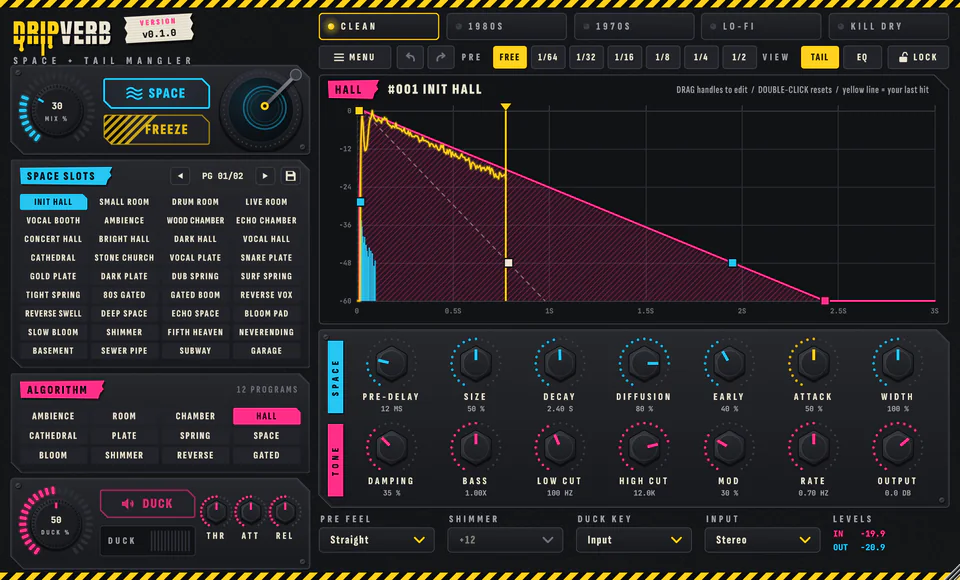
SIZE and DECAY set the size and length of the space, from 0.1 to 20 seconds, and PRE-DELAY moves the reverb up to 250 ms away from the sound.
- 02
Tone and width
DAMPING softens the tail, LOW CUT and HIGH CUT filter only the reverb, and WIDTH goes from mono to full stereo.
- 03
Drawn by the sound
About 30 times a second the reverb is measured, and each ring shows one moment: the inner rings are now, the outer ones up to 3 seconds ago.
- 04
Hand-drawn look
Lows bend the rings to the left, highs to the right, loud moments swell them, and the lines shimmer like a hand-drawn cartoon.
- 05
Seven presets
From small room to endless, switched with the arrows or picked from a list. A * marks an edited preset.
- 06
Workflow
A double-click resets a knob or opens value entry. The window scales from 67 to 200 %.
Specs
Simple Reverb
- Type
- Reverb
- Made for
- Any source
- Presets
- 7
- Latency
- 0 samples
- Formats
- VST3
- Version
- v1.0.1
- System
- Windows 10 and 11, 64-bit
- Hosts
- Ableton Live, FL Studio, Cubase, Reaper, Bitwig, Studio One and other VST3 hosts
- License
- Free, with an account
tone division
Questions
- Which DAWs are supported?
- Any host with VST3 support: Ableton Live, FL Studio, Cubase, Reaper, Bitwig Studio, Studio One and others.
- How are plugins installed?
- With Tone Division Terminal: after signing in, it installs and activates the plugins.
Free in Terminal
Simple Reverb
- For good: no trial, no key
- Installs and updates in Terminal
Free
Installation
More about Terminal- 01Free Tone Division account
- 02Sign in to Tone Division Terminal
- 03Installation